



If you’ve landed here, you’re probably not asking “What is GST?” anymore.
You already know your business needs a GST registration in Gurgaon / Gurugram. You’re also fairly convinced that renting a big office in Cyber City, Udyog Vihar or Golf Course Road just to get an address would be… excessive.
So the real question becomes:
“Can I use a virtual office in Gurgaon for GST registration – and if yes, how does the process actually work?”
This guide is built for that exact moment.
We’ll walk through:
-
When a Gurgaon virtual office makes sense for GST
-
The documents you actually need (from your provider and your business)
-
A step-by-step process for GST registration in Gurgaon using a virtual office address
-
Common pitfalls that cause delays or rejections – and how to avoid them
-
How this plays out in practice when you use a provider like Xporate, which offers GST-ready virtual office plans in Gurgaon
If you’re still unsure about the whole “virtual office” idea itself, you can always read the India-wide and Gurgaon hub guides. But if you’re here for a Gurgaon-specific GST how-to, you’re in the right place.
Before You Start – Is a Gurgaon Virtual Office the Right Fit for Your GST Use Case?
Before jumping into forms and scans, sanity-check that a Gurgaon virtual office is the right tool for your situation.
When a Gurgaon virtual office works well for GST
A virtual office in Gurgaon is usually a great fit if:
-
You already have a business and want to add Haryana GST via Gurgaon
-
You’re incorporating a new company in Gurgaon and want to do GST registration using the same address
-
You’re an e-commerce seller who needs a Haryana GST registration or APOB for logistics / compliance reasons
-
You’re a service business (SaaS, IT, consulting, marketing, finance, etc.) and your real work is mostly online or at client sites
In these cases, the Gurgaon address is about compliance, credibility and convenience, not about housing your entire team every day.
When you should pause and talk to your CA first
You may still end up using a Gurgaon virtual office, but definitely talk to your CA if:
-
You need a warehouse, factory or production facility to be your main place of business
-
You’re applying for a licence that expects a fully operational physical site as the primary premises
-
You’re confused whether Gurgaon should be your principal place of business or just an Additional Place of Business (APOB)
A virtual office can still be a powerful head office or correspondence address, but for some industries you’ll still need a dedicated operational site elsewhere.
Quick recap: how virtual offices plug into GST
In simple terms:
-
GST cares that you have a real place of business, backed by documents
-
A virtual office in a genuine business centre is just one way to satisfy that requirement
-
The key ingredients are:
-
A commercial Gurgaon address
-
A formal agreement + NOC + premises proof
-
Clean, consistent details in your GST application
Documents Required for GST Registration in Gurgaon with a Virtual Office
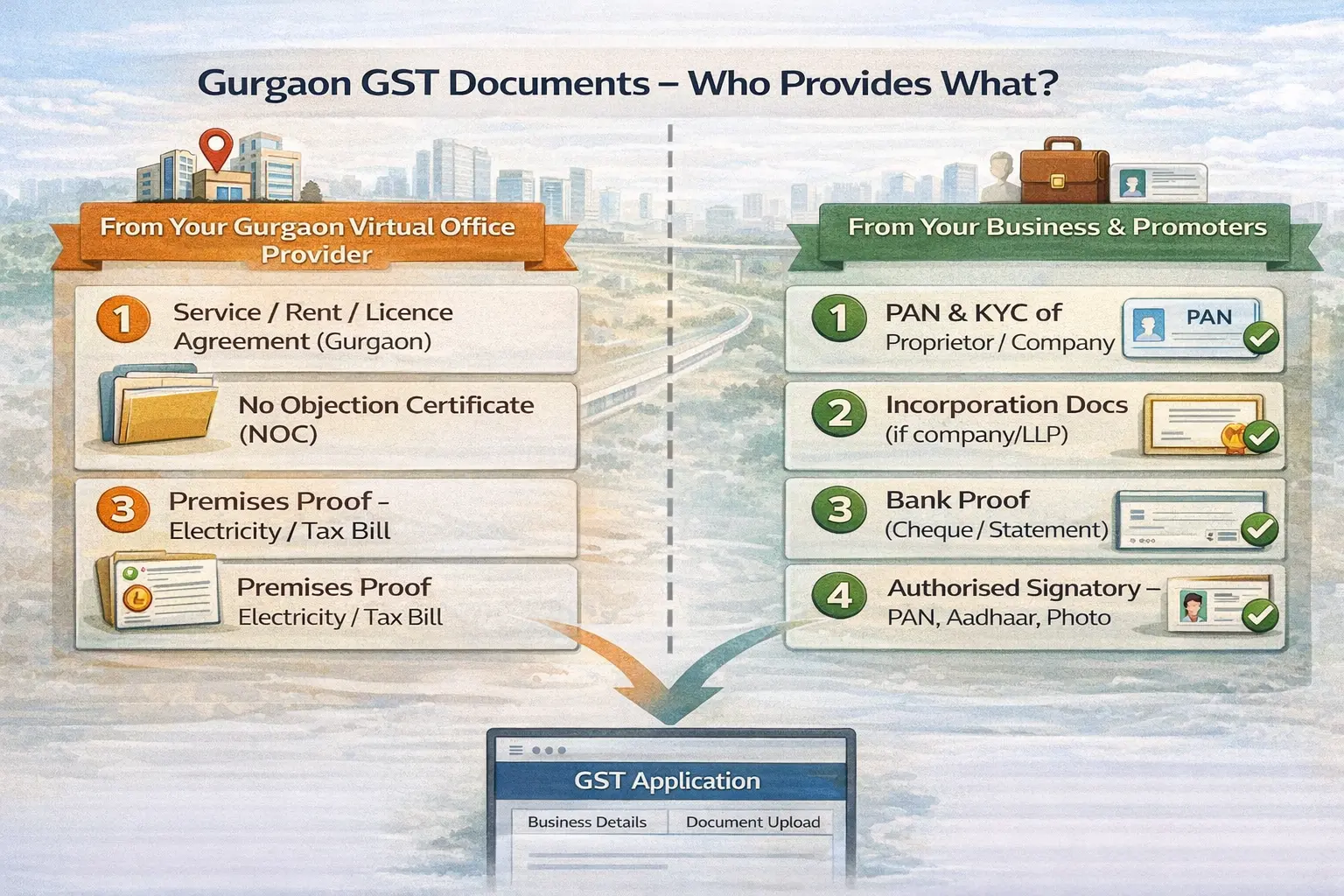
Let’s get into the paperwork. For GST in Gurgaon using a virtual office, you’ll deal with two buckets of documents:
-
From your Gurgaon virtual office provider
-
From your business and promoters
1. Documents from your Gurgaon virtual office provider
For Haryana / Gurgaon GST, your provider should give you a GST-ready documentation pack that typically includes:
-
Service / Rent / Licence Agreement
-
Between your business and the virtual office provider
-
Shows the full Gurgaon address you’ll use in your GST application
-
No Objection Certificate (NOC)
-
From the owner / operator
-
Confirms they have no objection to you using the premises as your place of business
-
Recent Premises Proof
-
Usually an electricity bill, water bill, or property tax receipt
-
Must match the address on the agreement and NOC
Providers like Xporate design their Gurgaon virtual office plans so that this documentation pack is standard, and clearly positioned as suitable for GST and ROC purposes – not just for a nameplate or mail.
2. Documents from your business (entity + promoters)
Your CA or GST consultant will give you an exact checklist, but in broad strokes:
For a proprietorship:
-
PAN of the proprietor
-
Aadhaar and photo of the proprietor
-
Bank proof (cancelled cheque, bank statement or passbook)
-
Additional KYC as per the portal (email, mobile, etc.)
For a company or LLP:
-
PAN of the company / LLP
-
Incorporation certificate
-
MoA/AoA or LLP Agreement
-
PAN, Aadhaar and photos of directors/partners and authorised signatory
-
Board resolution / authorisation letter for authorised signatory
-
Bank proof (statement, cancelled cheque, or passbook)
Plus, of course:
-
Valid email and mobile of the authorised signatory for OTPs and portal login.
3. Extra things that make life easier in Gurgaon
Not mandatory, but highly recommended:
-
A master address line document where you freeze the exact Gurgaon address spelling and copy-paste it into every form and scan label.
-
Scans that are clear, properly cropped, and within size limits – avoid photos with shadows and tilted pages.
-
A short pre-check with your CA to confirm that the provider docs line up with what local officers usually accept.
✅ Gurgaon GST Registration – Quick Checklist
You can style this as a box/table in your CMS:
-
✔ Agreement (virtual office in Gurgaon)
-
✔ NOC from premises owner/operator
-
✔ Recent utility bill / premises proof for the Gurgaon address
-
✔ PAN & KYC of authorised signatory
-
✔ Entity incorporation docs (if applicable)
-
✔ Bank proof (cheque / statement / passbook)
-
✔ Email & mobile for OTPs
Step-by-Step: GST Registration in Gurgaon with a Virtual Office Address
Now for the main course: how the process actually works.
We’ll keep it at a conceptual portal level (since the UI can change), but this flow holds up in real life.
Step 1 – Decide how Gurgaon fits into your GST structure
First, talk to your CA about Gurgaon’s role:
-
Will Gurgaon be your principal place of business?
-
Common if you’re incorporating in Gurgaon and see it as your HQ.
-
Or will Gurgaon be an Additional Place of Business (APOB)?
-
Common if your main base is elsewhere but you want a Gurgaon presence.
This decision affects how your CA files the application or amendment, so don’t skip this step.
Step 2 – Get your Gurgaon virtual office documentation pack
Before you even open the GST portal, get your docs in order.
With a provider like Xporate, the flow typically looks like:
-
You choose a Gurgaon centre and plan that includes GST support.
-
You complete KYC and basic onboarding with them.
-
Once approved, they issue your agreement, NOC and premises proof for that Gurgaon address.
Share these documents with your CA to check they’re in line with expectations for Haryana GST.
Step 3 – Prepare clean digital copies of all documents
This sounds minor, but it saves a lot of pain:
-
Scan documents in a clear, readable resolution.
-
Name files sensibly (e.g., Gurgaon-Agreement.pdf, Gurgaon-NOC.pdf, Gurgaon-UtilityBill.pdf).
-
Use the same address spelling everywhere – copy-paste from your master address line.
Many noisy queries come from tiny spelling mismatches and poor scans, not from the concept of “virtual office” itself.
Step 4 – Fill in the GST application with your Gurgaon address
Whether you’re filing a new GST registration in Haryana or adding Gurgaon as a new place of business, your CA will:
-
Log into the GST portal with the relevant details.
-
When they reach the Place of Business section for Haryana, they’ll enter the Gurgaon virtual office address.
-
Choose an appropriate nature of premises (typically rented/shared, depending on available options).
-
Accurately describe your business activities (services, trading, etc.).
Your job is to ensure they use the exact address from your agreement and that everyone knows this will be the place of business for Gurgaon.
Step 5 – Upload Gurgaon documents and submit
Next, your CA uploads:
-
The Gurgaon agreement as proof of right to use the premises
-
The NOC as owner/operator consent
-
The utility bill or premises proof
Alongside:
-
Your entity documents and promoter KYC
-
Bank proof
-
Any additional docs requested by the portal
After submission, the system generates an ARN (Application Reference Number). Keep that handy for tracking.
Step 6 – Handle queries or site visits at the Gurgaon centre
After your application is filed, a few things can happen:
-
The application gets approved smoothly.
-
The officer raises a query asking for clarifications or better scans.
-
The officer may plan a site visit to verify the Gurgaon address.
If there’s a query:
-
Read it carefully with your CA.
-
Many queries are solved by re-uploading clearer documents or adding a short explanatory note.
-
Loop in your virtual office provider if documents need corrections.
If there’s a site visit:
-
Make sure the front desk team at the Gurgaon centre knows your company name and that you’re a virtual office client.
-
Follow any signage or listing recommendations from your provider (e.g., name in a directory or at reception).
-
Keep soft copies of your agreement and NOC available in case questions come up.
Providers like Xporate are used to this workflow and can guide you on what typically happens when officers visit their Gurgaon centres.
Step 7 – Post-approval: verify details and start using your GST registration
Once your GST registration is approved:
-
Download your GST registration certificate.
-
Confirm that the Gurgaon address appears correctly.
-
Update:
-
Your billing system (so invoices show the right address and GST details)
-
Any platforms you sell on (marketplaces, payment gateways, etc.)
-
Internal documentation and templates
Then align with your provider on:
-
How mail and notices will be handled at the Gurgaon address
-
Who will be notified, and how, when something arrives
Common GST Pitfalls with Gurgaon Virtual Offices (and How to Avoid Them)
Even with a solid plan and a good provider, there are a few recurring mistakes.
Pitfall 1 – Address mismatches everywhere
A classic issue:
-
The address on your agreement is written one way
-
Your CA types it slightly differently in the GST form
-
The utility bill has a third variation
How to avoid it:
-
Create a single source of truth for your Gurgaon address from your provider docs.
-
Copy-paste that version into every form and document.
-
If the provider docs themselves are inconsistent, ask them to correct and reissue them before filing.
Pitfall 2 – Weak or informal premises documentation
Some businesses try to use:
-
Friend’s flats
-
Loosely structured arrangements
-
Addresses without formal agreements or NOCs
This can work temporarily, but it’s fragile.
How to avoid it:
-
Stick to a provider who explicitly offers GST-ready virtual office plans in Gurgaon, with a clear agreement, NOC, and premises proof.
-
Avoid any setup where the provider hesitates to share sample documents (with sensitive info redacted).
Pitfall 3 – Incomplete or messy KYC
Virtual office or not, incomplete KYC causes queries:
-
Expired ID proofs
-
Poor-quality scans
-
Missing board resolutions / authorisations
How to avoid it:
-
Use a structured checklist from your CA and tick each item off.
-
Keep scanned versions of all important documents in a central folder so you don’t scramble every time.
Pitfall 4 – Assuming “no one will ever visit”
Some founders treat the virtual office like a P.O. box, assuming authorities will never show up.
How to avoid it:
-
Ask your provider how they handle site visits.
-
Make sure your company name is known at the front desk, and that basic info about your virtual office model is clear.
-
Treat the Gurgaon centre as a real place of business, not a ghost location.
🔗 Internal link placeholders:
-
From here, link to IN-SUP-01 for a deeper legality/risk discussion.
-
Also link to IN-SUP-02 for a fuller GST best practices list for virtual office addresses.
Using Your Gurgaon GST Registration in Day-to-Day Business
Once your GST registration is live, the address starts to show up everywhere – not just in filings.
Updating invoices, portals and contracts
Make sure:
-
Your invoicing tools show the correct Gurgaon address and GSTIN.
-
Any contracts, proposals, and standard documents that reference your place of business are updated.
-
Your team knows which GSTIN and address to use for which clients or transactions, especially if you have multi-state GST.
Mail, notices and courier handling at your virtual office
With a Gurgaon virtual office plan:
-
The centre staff receive mail and notices on your behalf.
-
They follow a defined notification process – email, dashboard, phone, WhatsApp, etc., depending on the provider.
-
You can either pick up items or request scans/forwarding.
Clarify this up front with your provider so nothing important goes missing.
Scaling from Gurgaon to multi-city GST presence
Once you’ve done Gurgaon, the pattern for other cities is similar:
-
Decide the role of each city (principal vs APOB)
-
Set up a virtual office in that city
-
Repeat the docs + portal flow
If you know you’ll eventually be in Delhi, Bangalore, Mumbai and more, it’s worth choosing a provider like Xporate that can support multi-city virtual offices, not just a one-off Gurgaon address.
FAQs – GST Registration in Gurgaon with a Virtual Office Address
1. Is a virtual office in Gurgaon accepted as a place of business for GST?
Yes. A virtual office address in Gurgaon can be used as your place of business for GST as long as it is a genuine commercial premises and you have proper documentation (agreement, NOC, and premises proof). Officers are mainly concerned with legitimacy and consistency, not the label “virtual office”.
2. Are there any special rules in Haryana for using a virtual office for GST?
Haryana follows the same GST framework as the rest of India. There isn’t a separate “virtual office” category in the law. In practice, officers may look more closely at shared or business-centre addresses, so having a strong documentation pack and working with an experienced provider helps.
3. What documents should my Gurgaon virtual office provider give me for GST?
Typically:
-
A service / rent / licence agreement for the Gurgaon premises
-
A No Objection Certificate (NOC) from the owner/operating company
-
A recent utility bill or premises proof for that address
If a provider can’t supply these, think twice about using that address for GST.
4. How long does GST registration using a virtual office in Gurgaon usually take?
Once your documents are ready and the application is filed, timelines depend on:
-
Officer workload
-
Whether any queries are raised
-
Whether a site visit is scheduled
Assuming clean documentation and no major issues, registrations often complete within a few weeks. Your CA or GST consultant can give you a more specific estimate based on recent experience.
5. What happens if a GST officer visits the Gurgaon business centre?
During a visit, the officer will typically:
-
Confirm that the address exists and is an active business premises
-
Check that the centre recognises your company as a client
-
Ask basic questions about your business activity and premises use
If your virtual office provider is prepared, their front-desk team will know how to respond, and any recommended signage or name listing will already be in place.
6. Can I use the same Gurgaon virtual office for both GST and company registration?
Yes. Many businesses use the same Gurgaon virtual office address as their registered office for ROC and their place of business for GST. You just need to choose a plan that covers both use cases and keep your documentation and filings consistent.
7. Can I add Gurgaon as an Additional Place of Business using a virtual office?
Yes. If your principal place of business is in another state or city, you can add a Gurgaon virtual office address as an APOB under your existing GST registration. Your GST consultant will file the appropriate amendment or registration using the Gurgaon documentation pack.
8. What if my GST application is rejected when I use a virtual office address in Gurgaon?
Most rejections are due to practical issues: address mismatches, unclear scans, or missing documents. Review the rejection note with your CA and your provider, fix the specific problems, and reapply with clearer documentation and, if needed, a short written clarification.
9. Can I later move my GST address from a Gurgaon virtual office to a physical office?
Yes. You can amend your GST registration to move your principal place of business or APOB from the virtual office address to a new physical premises. This is common when teams outgrow virtual setups and move into dedicated offices or warehouses.